Choose Zapier when speed and breadth matter more than centralized control. Choose Workato when your organization needs IT-led governance, environment promotion, and deep connector coverage for regulated or complex enterprise systems.
That is the core split, and almost every procurement conversation eventually collapses into it. Here is how it breaks down by scenario:
- Small teams and departmental automation: Zapier wins on speed and self-serve pricing, letting non-technical staff ship working automations in an afternoon.
- Centralized IT with change-management requirements: Workato's recipe lifecycle and environment promotion (staging to production) match how enterprise architecture teams already operate.
- Healthcare or other regulated workflows: Workato is the safer default because it publishes HIPAA support with signed BAAs, something Zapier does not currently offer.
- Long-tail SaaS stacks with niche apps: Zapier's connector catalog is broader, so obscure tools are more likely to already have a native integration.
- Mixed environments with both simple and complex needs: Many organizations run both platforms side by side rather than forcing a single vendor to cover every use case.
Key Takeaways
Zapier wins on speed and connector breadth for team-driven automation, while Workato wins on governance, connector depth, and compliance for IT-led enterprise programs.
| Point | Details |
|---|---|
| Match tool to owner | Business-led teams fit Zapier; IT-led governance programs fit Workato. |
| Confirm connector depth | Test the exact API operations you need, not just whether an app appears in the catalog. |
| Compliance requires proof | Request a signed BAA and SOC/ISO documentation before committing to regulated workflows. |
| Budget for hidden costs | Task and action overages, plus professional services, often exceed the published sticker price. |
| Consider agency support | Cannatract's audit-to-pilot model typically ships a working system in two to four weeks when scoping is the real bottleneck. |
Table of Contents
- Zapier vs Workato: Comparing Where Each Platform Wins
- How Do Connector Breadth and Depth Actually Differ?
- What Governance and Compliance Gaps Should IT Teams Check?
- How Long Does Each Platform Take to Implement?
- What Do Zapier and Workato Pricing Plans Actually Cost?
- Can Either Platform Handle High-Volume, Real-Time Workflows?
- What Support Should You Expect After Signing?
- Which Platform Fits Your Specific Situation?
- What Should Be on Your Procurement Checklist?
- When Does Hiring Help Actually Shorten the Timeline?
- The Real Question Isn't Which Platform Is Better
- Ready to Skip the Trial-and-Error Phase?
- Sources
- FAQ
Zapier vs Workato: Comparing Where Each Platform Wins
The two platforms solve different problems, and the comparison only makes sense once you separate "who builds automations" from "who governs them." Zapier is built for business users who need results now. Workato is built for IT teams who need auditable, repeatable processes across enterprise systems.
| Dimension | Zapier | Workato |
|---|---|---|
| Best for / recommended use case | Teams needing fast, self-serve automation across many apps | IT-led programs needing governed, auditable integrations |
| Connectors (count & depth) | Very large catalog, broader coverage of long-tail apps | 1,200+ connectors with deeper per-app API coverage |
| Governance & compliance | SSO, audit logs, action restrictions at Team/Enterprise tiers | Environment promotion, HIPAA BAAs, broader compliance portfolio |
| Pricing model & transparency | Published, self-serve pricing tiers | Primarily quote-based enterprise pricing |
| Time to implement | Hours to days for most automations | Days to weeks for governed, multi-system recipes |
| Support & customer success | Standard tiers, upgraded support at higher plans | Dedicated success teams for enterprise accounts |
| Scalability / real-time integration | Strong for moderate volumes, some manual retry needs | Batch processing and automated replay-on-failure |
| AI / orchestration features | Emerging AI features layered onto existing automations | Governed AI agent studio with packaged distribution |
A few things stand out immediately. Zapier's biggest edge is connector breadth, not depth, meaning it plugs into more apps but exposes less of each app's full functionality. Workato flips that: fewer total connectors, but each one reaches deeper into the underlying API. On compliance, the gap is stark. Workato's environment-promoted deployment model gives auditors a change record Zapier's account-native structure was never designed to produce.
How Do Connector Breadth and Depth Actually Differ?

"Breadth" means how many apps a platform connects to. "Depth" means how much of each app's API the connector actually exposes, including edge cases like custom fields, webhooks, and batch operations.
Zapier's advantage is coverage. If your stack includes a smaller SaaS tool your finance team picked up last year, there is a good chance Zapier already has a native integration for it. Zapier's own comparison leans on this breadth as a core selling point, and it holds up in practice for teams juggling a long tail of niche apps.
Workato takes the opposite bet. Its connectors are fewer but built for the systems enterprises actually run on: ERP, HR, finance, and core operational platforms. Workato's documentation describes on-prem agents, API management, and workflow orchestration designed to reach further into an app's data model than a typical no-code connector would attempt.
Custom connectors matter here too. Both platforms let you build your own when a native connector does not exist, but the maintenance burden differs. A custom connector built against a vendor's changing API needs someone watching that changelog. Workato's IT-led model assumes that ownership exists somewhere in the org; Zapier's business-user model often does not.
- Zapier: broad catalog, shallower per-app depth, easier for non-developers to configure
- Workato: narrower catalog, deeper per-app coverage, built for developer-adjacent teams
- Both support custom connectors, but the ongoing maintenance responsibility looks different in each model
Pro Tip: Before signing anything, ask the vendor to demo the exact connector and the exact API operations your workflow needs. A "yes, we support that app" answer means nothing if the connector only exposes read access when your workflow needs to write records.
What Governance and Compliance Gaps Should IT Teams Check?
The question that actually decides most enterprise deals is not "which platform has more features," it is "which platform can survive an audit." Workato's recipe-native architecture supports environment promotion, meaning a recipe moves from staging to production with a documented trail. Zapier's governance lives at the account level: SSO, audit logs, and action restrictions apply across the account rather than to individual automation lifecycles.
That distinction shows up hardest in regulated industries. Workato publishes HIPAA support with signed BAAs and a broader compliance portfolio than Zapier currently offers, which matters if your workflows touch protected health information.
By the numbers: Workato's published connector library exceeds 1,200 pre-built integrations focused on enterprise systems, a figure worth confirming directly with a vendor demo since coverage per app varies.
Checklist items to request during procurement:
- SSO and SCIM support, not just SSO
- Audit log retention periods and export options
- Environment promotion (staging to production) with a change record
- Signed BAA availability if you handle PHI
- SOC 2 and ISO certification documentation, not just a marketing claim
Red flag: any vendor that cannot produce a signed BAA on request when your workflow touches PHI or that describes "environment separation" without a concrete promotion workflow you can see in a demo.
How Long Does Each Platform Take to Implement?
Zapier's biggest practical advantage is speed. A business user can connect two apps and have a working automation running within an hour, often without involving IT at all. That is by design: Zapier's published pricing and self-serve model assume the builder is a marketer or ops person, not a developer.
Workato's timelines run longer because the work usually involves more stakeholders. A governed recipe touching finance and HR systems typically takes days to weeks, not hours, and often requires IT sign-off before it reaches production.
- Simple Zaps: hours to a day, no IT involvement required
- Workato recipes touching multiple enterprise systems: days to weeks, IT and security review included
- Pilot to production for enterprise programs: budget for professional services time beyond the platform license itself
- Common delay causes: unclear data ownership, missing API credentials, and unreviewed compliance requirements
What Do Zapier and Workato Pricing Plans Actually Cost?
Zapier publishes its pricing tiers, so a buyer can estimate cost before ever talking to sales. Zapier's Team and Enterprise plans add governance features like SAML SSO and audit logs as you move up tiers, but the base pricing structure is task-based and visible on the website.
Workato generally requires a quote, with pricing based on usage and the scope of the deployment rather than a flat published rate.
Cost callout: the biggest hidden cost driver on either platform is action or task volume at scale. High-frequency workflows can push usage past a plan's included allotment faster than teams expect, and overage billing varies by vendor.
Procurement questions worth asking directly:
- What happens when we exceed our included task or action ceiling?
- Are professional services included in the quote, or billed separately?
- Is there a cap on concurrent workflows, or does pricing scale linearly with volume?
- Does the contract lock in pricing for a fixed term, or can costs shift at renewal?
Zapier's self-serve model suits teams that want predictable, visible pricing from day one. Workato's quote-based model suits organizations that need custom terms but should expect a sales-led negotiation before signing.
Can Either Platform Handle High-Volume, Real-Time Workflows?
Volume and reliability separate the platforms almost as much as governance does. Workato supports batch processing alongside real-time triggers, which matters when a workflow needs to move thousands of records at once rather than one at a time.
Error recovery is the other differentiator. Enterprise-grade platforms typically offer replay-on-failure and automated retry policies, while simpler no-code tools often require someone to manually re-run a failed task. That difference is invisible until something breaks at 2 a.m. and nobody is watching.
- Batch processing: reduces task consumption for large-volume operations, a Workato strength
- Real-time triggers: both platforms support them, but recovery from missed events differs
- Replay-on-failure: available on Workato; Zapier failures often need manual intervention
Pro Tip: Pilot your highest-volume workflow on a small dataset first. Watch how each platform bills for it and how it behaves when a downstream API times out. That single test tells you more than any sales deck.
What Support Should You Expect After Signing?
Support quality often decides whether an automation program survives its first year. G2's comparison of user sentiment shows both platforms scoring well on ease of use, with support quality diverging more at the enterprise tier than at entry level.
Workato tends to assign dedicated customer success resources for enterprise accounts, reflecting its sales-led model. Zapier's support scales with plan tier, with faster response times reserved for Team and Enterprise customers.
- Ask what response time SLA applies to your specific plan tier, not the marketing average
- Ask whether onboarding assistance is included or billed as a separate professional-services engagement
- Ask who owns ongoing maintenance once the initial build ships: the vendor, an internal team, or a partner agency
Which Platform Fits Your Specific Situation?
Match the platform to your organizational reality rather than to feature checklists. A few concrete scenarios:
- A 20-person SaaS company automating lead routing: Zapier fits. Marketing and sales can build and iterate without waiting on engineering.
- A hospital system automating patient intake data flows: Workato fits, and insist on a signed BAA before any PHI touches the platform.
- An enterprise replacing manual ERP-to-finance reconciliation: Workato's deeper connector coverage for core systems handles this better than a shallow integration would.
- A cross-department automation program spanning five business units: Workato's recipe lifecycle management gives IT the visibility that a patchwork of individual Zapier accounts cannot.
- A hybrid organization with both simple and complex needs: Running both platforms is common. Use Zapier for team-level speed and Workato for governed enterprise flows, and plan for someone to own integration maintenance on both sides as APIs change upstream.
Konnectify appears in some review comparisons as an alternative worth evaluating alongside these two, particularly for teams researching niche connector options beyond the two market leaders. It has not built the same enterprise compliance track record as Workato, so treat it as a research candidate rather than a default pick for regulated workloads.
What Should Be on Your Procurement Checklist?
Work through these in order. Do not skip to pricing before confirming the platform can technically do what you need.
- Confirm connector depth for your top three critical systems. Ask for a live demo of the exact API operations your workflow requires, not a feature list.
- Request governance attestations in writing. SOC 2, ISO certification, and a signed BAA if PHI is involved. A verbal "yes, we support that" is not sufficient.
- Test pricing against realistic volume. Run your expected task or action volume through both pricing models before comparing sticker price.
- Verify environment promotion behavior. If you need staging-to-production change records for an audit, see the actual workflow in a demo, not a slide.
- Define pilot acceptance criteria before you start. Decide up front what "ready for production" means: error rate, latency, and rollback behavior.
Walk away from any vendor that cannot produce a signed BAA when PHI is involved, cannot demonstrate environment promotion when your auditors require one, or gives a vague answer about overage billing.
When Does Hiring Help Actually Shorten the Timeline?
The bottleneck on most automation programs is not the platform, it is scoping. Teams often pick a tool correctly and still stall for months because nobody mapped the actual workflow, the exception cases, or who owns the data before building started.
Project-based help closes that gap fastest when the workflow touches multiple systems, when PHI or other regulated data is involved, or when a cross-department rollout needs one accountable owner instead of five stakeholders each building their own piece.
A typical audit-to-pilot-to-production timeline runs about two to four weeks for an initial working system, assuming the scope is a single high-value workflow rather than an entire department's operations.
- An automation audit typically identifies the highest time-cost workflow and maps its current state
- A pilot validates connector depth, governance requirements, and rough ROI before a full build
- Production handoff includes documentation so an internal team can maintain the system going forward
The Real Question Isn't Which Platform Is Better
Most comparisons frame this as a feature contest, and that misses the point. Zapier and Workato were built to solve different organizational problems, and neither one is trying to win the other's game.
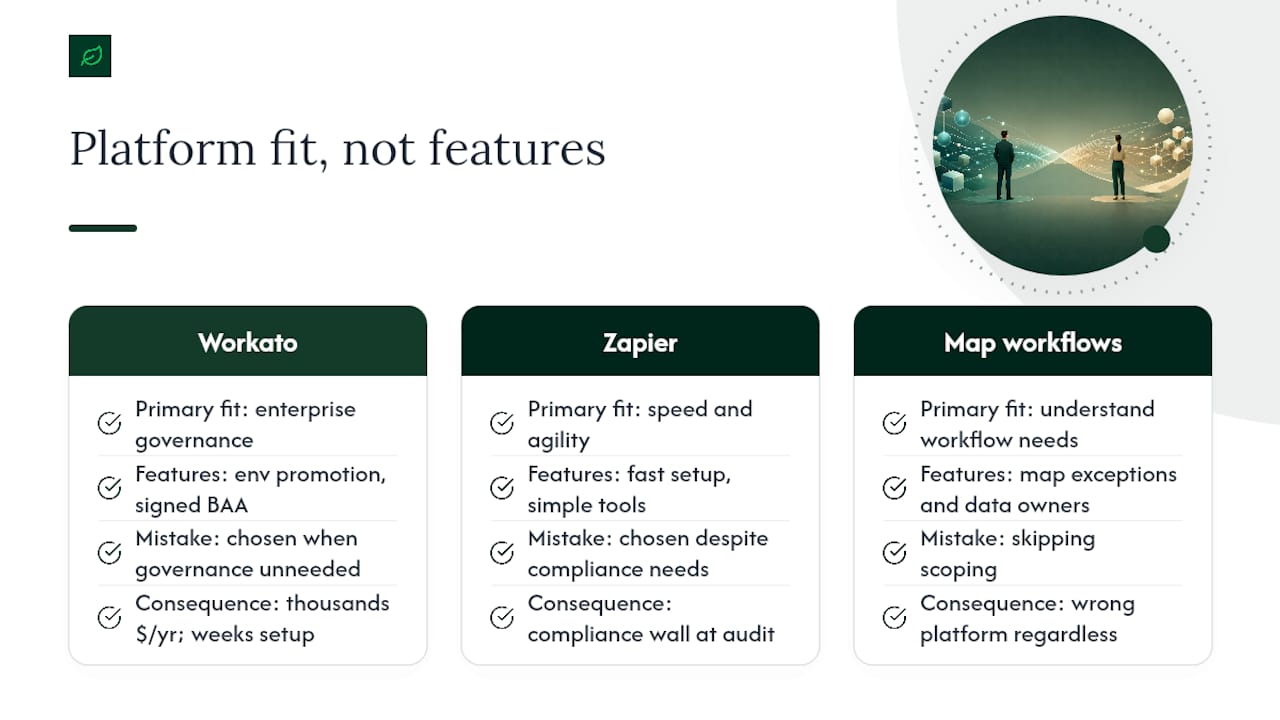
The mistake I see most often is a company choosing Workato because it sounds more "enterprise," then discovering their team never needed environment promotion or a signed BAA in the first place. That is thousands of dollars a year and weeks of implementation time spent on governance nobody asked for. The inverse mistake is just as common: a healthcare startup picks Zapier for its speed, only to hit a compliance wall six months later when an auditor asks for a change record the platform was never built to produce.
What gets underestimated in almost every comparison article is scoping time. The platform choice takes an afternoon of research. Mapping the actual workflow, its exceptions, and who owns the resulting data usually takes longer than picking between these two tools ever will. Get that part wrong and it does not matter which platform you picked.
Ready to Skip the Trial-and-Error Phase?
Choosing between Zapier and Workato is only half the decision. The harder part is scoping the actual workflow, confirming connector depth for your specific systems, and making sure governance requirements are met before you build anything. Cannatract runs that process for you: a free automation audit maps your highest-cost workflow, tests the connectors you actually need, and flags governance gaps before you sign a contract with either platform.
This isn't a generic consulting engagement. Cannatract ships a working pilot system in two to four weeks with a fixed quote up front, so you know the cost before committing. That approach makes sense when your workflow touches PHI, spans multiple departments, or needs the kind of environment-promoted governance that takes real configuration work to get right. If your needs are simpler, our automation software breakdown can help you decide whether a self-serve platform is enough on its own.
Ready to see what an audit turns up? Book a free automation audit and get a clear picture of your workflow, your governance requirements, and a fixed quote before you spend a dollar on either platform.
Sources
- Workato vs Zapier — Enterprise iPaaS vs No-Code (2026) | Automation Atlas
- Zapier vs. Workato comparison: Which is best? 2026
- Workato vs Zapier — Enterprise Integration vs App Automation in 2026 | Logic
FAQ
Is There Anything Better Than Zapier?
It depends on the need: Workato offers deeper governance and connector depth for enterprise use, while Konnectify appears in review comparisons as a niche alternative worth researching for specific connector requirements.
What Are Workato's Main Competitors?
Zapier is Workato's most commonly cited competitor for teams weighing no-code speed against enterprise governance, with Konnectify and other iPaaS-style tools appearing in comparative review lists as secondary options.
Is Workato Worth It?
Workato is worth the investment for organizations that need environment-promoted governance, deep ERP or HR connector coverage, or compliance features like signed HIPAA BAAs that Zapier does not currently publish.
How Do I Know Which Platform My Team Actually Needs?
Start by identifying who owns automation in your organization. If business teams build and iterate independently, Zapier fits; if IT needs auditable change records and compliance attestations, Workato fits better.
Can I Use Both Zapier and Workato at the Same Time?
Yes, many organizations run both, using Zapier for fast departmental automations and Workato for governed, cross-system enterprise workflows, though this requires someone to own integration maintenance across both platforms.