
The minimum effective stack against form spam is a honeypot field, a server-side timestamp check, per-IP rate limiting at the edge, and an AI-driven spam score, with CAPTCHA held in reserve as a step-up challenge for high-risk submissions only. This combination catches the overwhelming majority of automated junk without making a single human visitor click a traffic-light puzzle.
Get this running in the next 30 to 90 minutes:
- Add a hidden honeypot field and reject any submission that fills it.
- Issue a server-signed timestamp token on page load and reject submissions under two seconds or over 60 minutes.
- Turn on per-IP rate limiting at your edge or WAF.
- Route submissions through a spam-scoring check before they hit your inbox or CRM.
The UX verdict: keep your defenses invisible and server-side by default, and only surface a visible CAPTCHA when a submission's score puts it in genuinely risky territory.
Key Takeaways
Layered, server-first defenses (honeypot, timing checks, rate limits, and AI scoring) stop the vast majority of form spam without adding friction for real visitors.
| Point | Details |
|---|---|
| Start invisible | Deploy honeypot and time-token checks before adding any visible CAPTCHA. |
| Verify tokens server-side | Client-side checks alone can be bypassed by direct POST requests to your endpoint. |
| Score, don't just block | Route submissions as accept, review, or spam based on a combined probability score. |
| Match controls to threat type | Rate limits stop bot floods; classifiers catch human-written spam; email hygiene handles disposable signups. |
| Get expert help implementing | Cannatract builds and monitors the full stack, from edge rate limits to AI-based scoring, as one managed system. |
Table of Contents
- What Form Spam Looks Like and Why It Matters
- CAPTCHA Systems: Trade-Offs and Integration Guidance
- Bot Blocking and Managed Services at the Edge
- Honeypots and Other Invisible Tricks
- Content Filtering: Gibberish, Keywords, and Email Hygiene
- Rate Limiting and Endpoint Throttling
- Server-Side Validation: The Non-Negotiable Layer
- Scoring Submissions Instead of Just Blocking Them
- How to Choose the Right Mix for Your Site
- A Step-by-Step Checklist to Harden Your Form Endpoint
- Why Layered, Invisible Defense Beats Any Single Tool
- Let Cannatract Build and Run Your Form Defenses
- Sources
- FAQ
What Form Spam Looks Like and Why It Matters
Not all spam behaves the same way, and treating it as one blob is why so many sites over-defend against the wrong threat. There are four patterns worth knowing:
- Drive-by bot traffic — scripts hitting every form on the internet, submitting instantly with no page interaction, often in bursts.
- Human-operated spam — people (or CAPTCHA-solving farms) manually working through forms to plant links or scam messages, which behave much more like real users.
- Gibberish and randomized text — nonsense strings or keyword-stuffed messages meant to game SEO or overwhelm inboxes.
- Disposable-email signups — throwaway addresses used to grab a discount code or gate a download once, then vanish.
A bot submitting in 0.3 seconds needs a timing check, not a content filter. A human spammer typing coherent (if scammy) text needs a classifier that reads the message itself. A disposable Gmail alias needs email hygiene, not rate limiting. Matching the control to the pattern is what keeps your defenses effective and your false-positive rate low.
CAPTCHA Systems: Trade-Offs and Integration Guidance
CAPTCHA is not one thing anymore, and the differences between vendors matter more than most implementation guides admit.
Google reCAPTCHA remains the default choice for teams already inside Google's ecosystem. Its v3 risk-scoring mode runs invisibly, but it sends behavioral telemetry to Google, which is a dealbreaker for privacy-conscious teams and some regulated industries. hCaptcha positions itself as a privacy-respecting alternative with similar invisible scoring and a comparable integration pattern, though its bot-detection strength varies by risk tier. Cloudflare Turnstile skips the visible puzzle entirely, using browser and network signals to verify visitors while integrating directly with Cloudflare's WAF and rate-limiting rules if you already sit behind their edge. Cap takes a different route: it is an open-source, self-hosted CAPTCHA alternative that verifies visitors with proof-of-work and browser instrumentation instead of shipping data to a third party.
Trade-offs to weigh before you pick one:
- Effectiveness against modern bot farms varies. Visible challenges have gotten weaker as solver services and AI vision models improve.
- UX friction and accessibility suffer whenever a visible puzzle appears; invisible/risk-scoring modes avoid this entirely.
- Privacy and telemetry differ sharply. Cap and Turnstile keep more control in-house than reCAPTCHA's default configuration.
- Cost and rate limits apply to high-volume sites and should be checked against your monthly form volume before committing.
Integration checklist regardless of vendor: generate a site key and secret, verify the returned token server-side on every submission (never trust a client-side "success" flag), treat tokens as single-use to block replay attacks, and define fallback behavior (fail open vs. fail closed) if the CAPTCHA provider's API goes down.
Pro Tip: Configure your CAPTCHA in invisible or risk-scoring mode first, and only escalate to a visible challenge when a submission's risk score crosses a threshold. Most legitimate visitors should never see a puzzle at all.
Bot Blocking and Managed Services at the Edge
Edge-level defense stops bulk attacks before they ever reach your application code, which matters because every request your server has to parse and log costs you compute and log noise. Cloudflare's documented approach for protecting sensitive forms combines Turnstile, server-side token validation, edge rate limiting, and managed Application Security rules that block known attack signatures automatically.

A web application firewall (WAF) filters traffic by IP reputation, request patterns, and known bad actor fingerprints before a submission ever touches your form handler. Managed rulesets from your CDN or WAF provider update automatically as new attack patterns emerge, which saves you from chasing every new bot signature yourself.
Tuning matters more than the tool itself:
- Set rate-limit thresholds above your actual baseline traffic, not an arbitrary round number, or you'll throttle real users during traffic spikes.
- Use "managed challenge" actions instead of outright blocks where possible, so borderline traffic gets a chance to prove itself.
- Add explicit exceptions for legitimate crawlers and partner integrations that submit forms programmatically on purpose.
Review your security event logs weekly. If a rule is firing constantly against traffic that later converts, that's a false positive worth tuning out before it costs you leads.
Honeypots and Other Invisible Tricks
A honeypot is a form field hidden from human view with CSS, but left visible to bots that parse and fill every field they find. Any submission with that field populated gets silently rejected, often with a fake 200-success response so the bot doesn't learn it's been caught.
Pair it with a time-based token: issue a server-signed timestamp when the page loads, and reject any submission completed in under roughly two seconds or after 60 minutes, since both extremes are classic bot or replay behavior. Make each token single-use.
- Never mark the honeypot field
display: nonein a way that breaks screen readers, usearia-hiddenandtabindex="-1"together with visual hiding. - Name honeypot fields something a bot would want to fill (like "website" or "phone"), not something obviously fake.
- Test with a screen reader before shipping. Honeypots that trip up accessibility tools are a compliance liability, not a win.
Content Filtering: Gibberish, Keywords, and Email Hygiene
Once a submission passes timing and rate checks, the message content itself deserves scrutiny. Run gibberish detection against free-text fields like message bodies and comments, but never scan sensitive fields like passwords or payment data.
Basic heuristics that work well without heavy tooling:
- Flag messages under a minimum character count paired with excessive links (a two-word message with three URLs is rarely legitimate).
- Check character entropy. Random strings score very differently from real sentences.
- Maintain a forbidden-keyword list for common spam vocabulary, updated as new patterns show up in your logs.
Email hygiene closes a different gap. Validate syntax, check MX records to confirm the domain can actually receive mail, and consider blocking known disposable-email domains outright, especially on gated content forms where one-time signups are the whole business model. Free providers aren't inherently spam sources, so blocking them outright is usually overkill unless your data shows otherwise.
Pro Tip: Quarantine flagged submissions instead of deleting them. A recoverable holding queue lets you catch false positives and feed real labels back into your classifier, which is exactly how Form Plume recommends handling flagged spam.
Rate Limiting and Endpoint Throttling
Rate limits stop the volume-based attacks that content filtering alone can't catch. Key your limits by IP address combined with user agent for baseline protection, and add API-key or authenticated-user keying wherever you have logged-in submitters, since a single IP behind NAT can represent dozens of legitimate users.
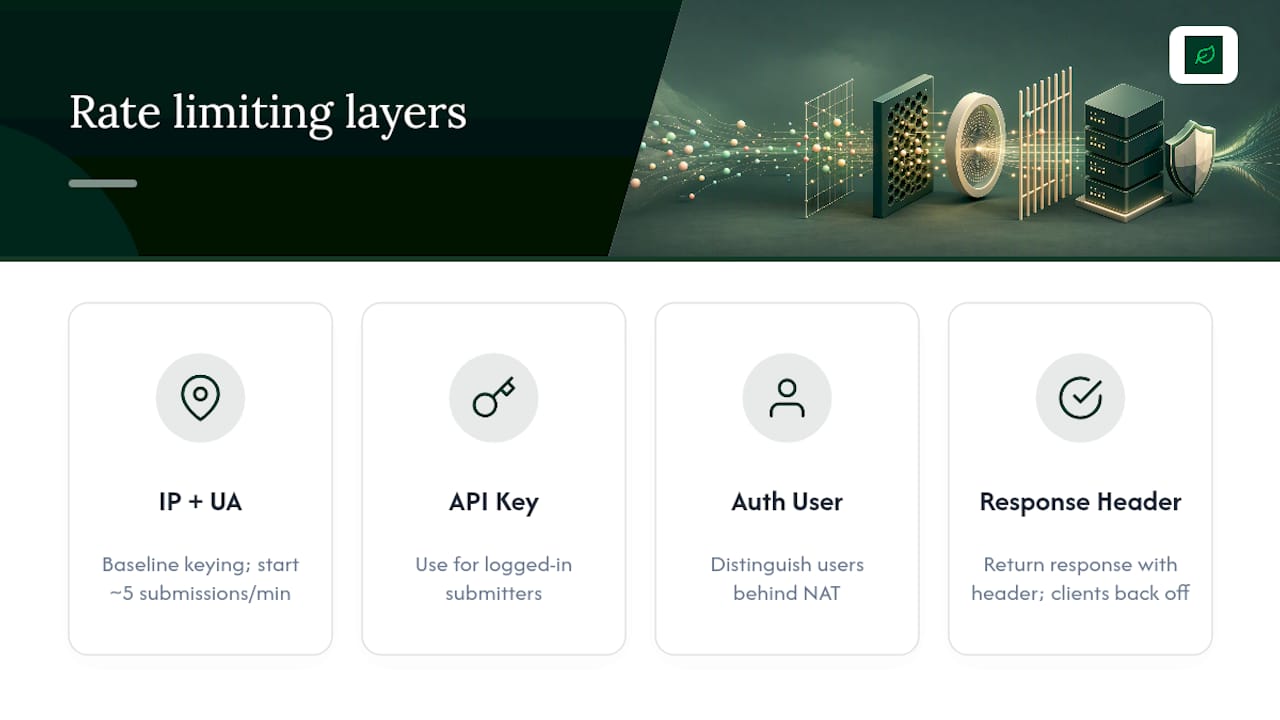
Start conservative and tune from real traffic: something like five submissions per IP per minute on a low-traffic contact form, higher for a checkout flow, and adjust after watching a week of baseline logs.
When a client exceeds the limit, return a proper 429 Too Many Requests response with a Retry-After header. Well-behaved clients (and legitimate integrations) respect that header and back off automatically, while bots that ignore it become easy to identify and block outright.
Server-Side Validation: The Non-Negotiable Layer
Client-side checks can always be bypassed. A bot doesn't need to load your page or run your JavaScript; it can POST directly to your form endpoint and skip your CAPTCHA widget entirely. That's why every token, whether from a CAPTCHA provider or your own time-trap, must be verified on the server before you process anything.
Sanitize and normalize every input field too, both to block injection attempts and to hand your spam classifier consistent, comparable text.
Your server-side checklist on every submission:
- Verify the CAPTCHA or Turnstile token against the provider's siteverify endpoint.
- Confirm the honeypot field is empty.
- Validate the time-token falls within your accepted window and hasn't been used before.
- Cross-check the submitting IP against your reputation and rate-limit data.
- Route the submission based on its combined score.
Scoring Submissions Instead of Just Blocking Them
A binary accept/reject decision throws away information. Combining signals into a single probability score gives you a much more useful routing policy: accept low-risk submissions automatically, quarantine medium-risk ones for human review, and drop high-risk ones without ever touching an inbox.
Useful signals to feed into that score:
- Time-on-page and time-to-submit
- Honeypot status (filled or empty)
- IP reputation and geographic anomalies
- Text classifier probability from your content filter
- Referrer and request header consistency
Track a small set of operational metrics weekly: false-positive rate, spam leakage rate (spam that made it through), review-queue size, and the most common spam patterns showing up in your quarantine folder. That last one tells you exactly what to retrain your classifier on next.
How to Choose the Right Mix for Your Site
A newsletter signup and a payment-collection form have almost nothing in common from a risk standpoint, so they shouldn't share identical defenses.
- Low-traffic contact form: honeypot, time-token, and basic rate limiting are usually enough. Skip CAPTCHA entirely.
- High-volume public signup: add a classifier and email hygiene checks; consider invisible CAPTCHA as a step-up for flagged sessions.
- Gated conversion funnel: prioritize UX. Keep everything invisible and reserve visible challenges for the highest-risk score band only.
- E-commerce checkout: stack every layer, since fraud risk and spam risk overlap here, but never let a false positive block a paying customer.
The general rule: the more sensitive or high-value the form, the more layers you stack, but visible friction should always be the last resort, not the first line.
A Step-by-Step Checklist to Harden Your Form Endpoint
Deploy in this order to catch issues early rather than debugging five layers at once:
- Enable edge rate limits and WAF rules first, since this layer needs the least code and gives you an immediate baseline.
- Add the honeypot field and time-token to your form and backend.
- Wire up server-side token validation for any CAPTCHA or verification service you're using.
- Add the content classifier and routing logic last, once you have real traffic data to tune it against.
- Set up monitoring and commit to sampling flagged submissions weekly.
Common failure modes: a spike in false positives usually means your rate-limit threshold is too tight for real traffic patterns; blocked partner integrations almost always trace back to a missing IP exception; and token verification failures are frequently a mismatched secret key between environments, so check staging versus production configs first.
Why Layered, Invisible Defense Beats Any Single Tool
Single-tool fixes fail because spam evolves faster than any one filter can track alone. A honeypot alone misses human spammers; a classifier alone misses raw bot floods hammering your rate limits.
The layered approach also controls cost: catching cheap, obvious bot traffic at the edge means your more expensive classifier only has to evaluate the submissions that actually need judgment. Sample your quarantined submissions weekly, label the real spam, and feed those labels back into your classifier. Reserve CAPTCHA for the narrow band of traffic your score genuinely can't resolve on its own.
Let Cannatract Build and Run Your Form Defenses
Cannatract is the alternative to stitching together five different spam tools yourself: we build the honeypot, timing checks, rate limits, and AI classifier as one working system, tuned to your actual traffic instead of generic defaults.

Most site owners don't have the time to sample quarantined submissions every week or retune a classifier as spam patterns shift, and that ongoing maintenance is exactly where a managed system pays for itself. Cannatract designs and ships custom AI automation for form hardening, including classifier integration and monitoring dashboards, alongside full web development and e-commerce builds when your form protection needs to be part of a larger site rebuild. Every engagement starts with a fixed quote, not an hourly clock.
Book a free automation audit at Cannatract and get a working assessment of your current form endpoints, what's leaking spam, and what a hardened version would look like, delivered in weeks, not months.
Sources
- Protect sensitive forms from fraud & abuse | Cloudflare Developers
- Cap — Open-source, self-hosted CAPTCHA alternative
- Form Spam Protection: 8 Defense Layers Tested (2026)
- Spam protection documentation and setup guide | Form Plume
Check your own CDN or WAF's rate-limiting documentation directly, since exact configuration syntax varies by provider.
FAQ
How do I stop form spam submissions?
Combine a hidden honeypot field, a server-side timestamp check, per-IP rate limiting, and a content classifier that scores each submission before it reaches your inbox or CRM.
Can you permanently block spam emails?
You can block specific domains and IP ranges outright, but spammers rotate addresses constantly, so ongoing filtering and classifier retraining work better than a one-time permanent block list.
How do I mark a contact as spam?
Most email clients and form platforms let you flag a sender or move a submission to a spam or quarantine folder, which should feed back into your filtering rules rather than just deleting the message.
How do I stop receiving 100 spam messages a day at that volume?
At high volume, the fix is almost always at the edge: add rate limiting and a managed WAF ruleset first, since a classifier alone can't handle bulk automated floods efficiently. Cannatract's automation services can help design that edge-to-classifier pipeline for high-traffic sites.
Is CAPTCHA still necessary if I use a honeypot?
Not always. A honeypot combined with timing checks and a classifier can handle the majority of automated spam with zero added friction, and CAPTCHA is best reserved as a step-up challenge only for submissions your score flags as genuinely risky.